
AI Workflow Automation: How Businesses Move Faster
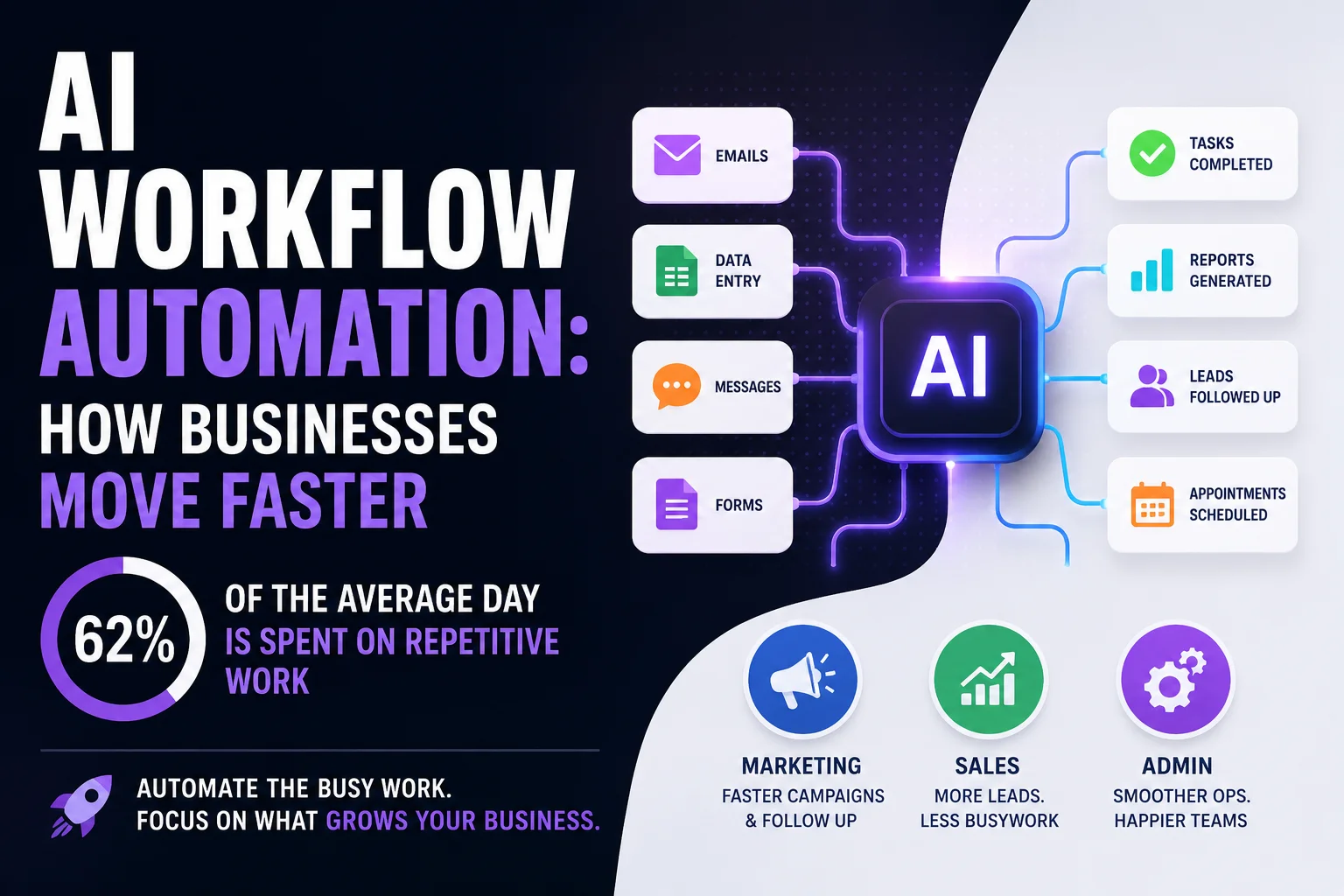
AI workflow automation handles the repetitive work that eats 62% of the average day. See how it speeds up marketing, sales, and admin for growing businesses.
Most teams do not lose time to big problems. They lose it to small, repeated ones. A form that gets copied into a spreadsheet. A lead that sits unread in an inbox. A report that someone rebuilds by hand every Monday morning.
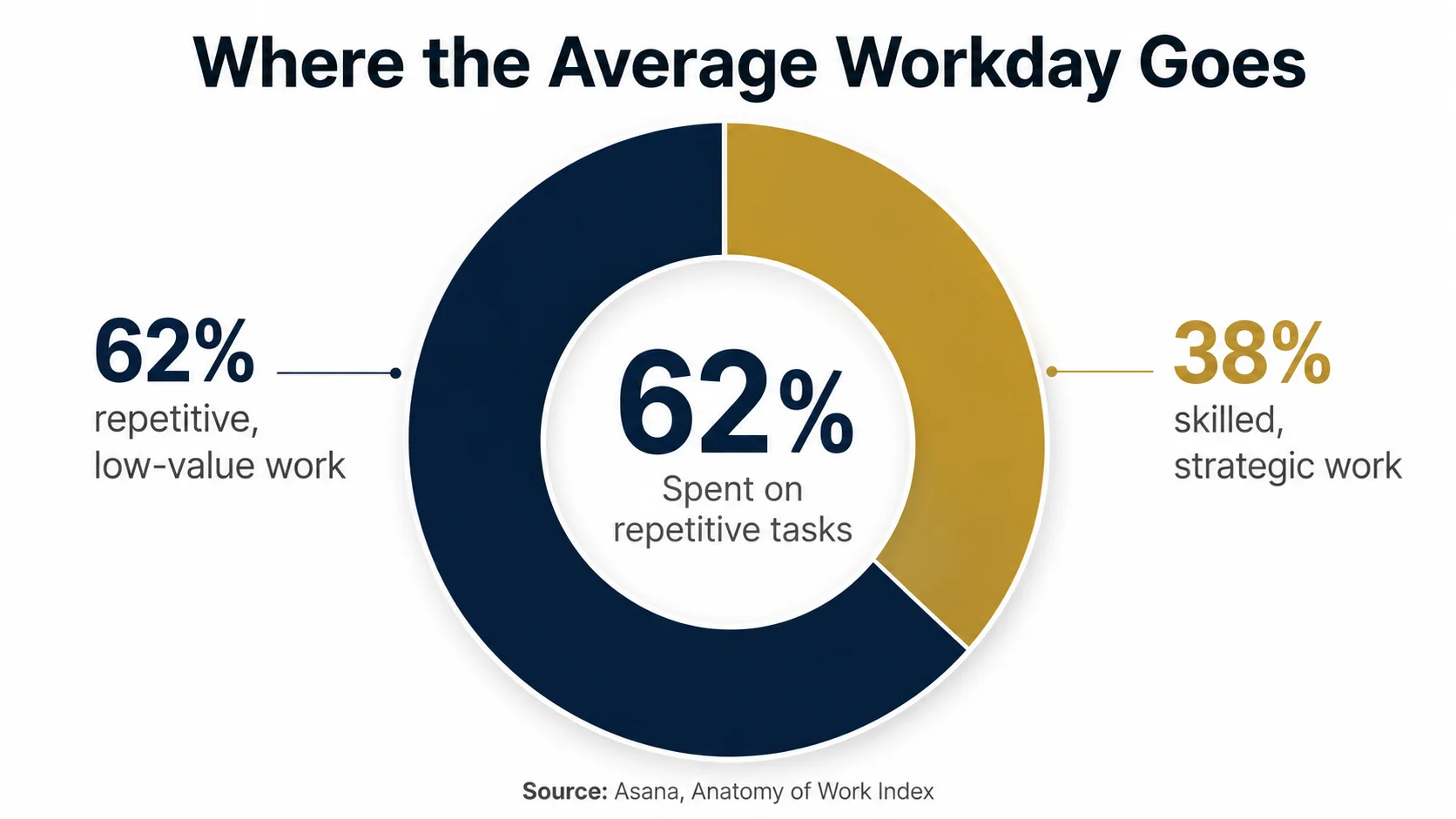
Add those minutes up and the cost is real. Asana’s 2023 Anatomy of Work Index found that 62% of the average workday goes to repetitive, low-value tasks instead of the skilled work people were actually hired to do. Microsoft’s 2025 Work Trend Index sharpens the point: during core hours, the typical employee is interrupted every two minutes by a message, email, or ping.
AI workflow automation is the practical fix. It hands the repeatable steps to software so your people can spend more time on the work that needs a human. This article explains what it is, where it speeds things up first, and how to start without betting the business on it.
Key takeaways
- AI workflow automation connects the tools you already use and lets software handle repetitive steps: data entry, routing, sorting, and first-draft content.
- Asana found 62% of the workday goes to repetitive tasks. That wasted time is exactly what automation aims to give back.
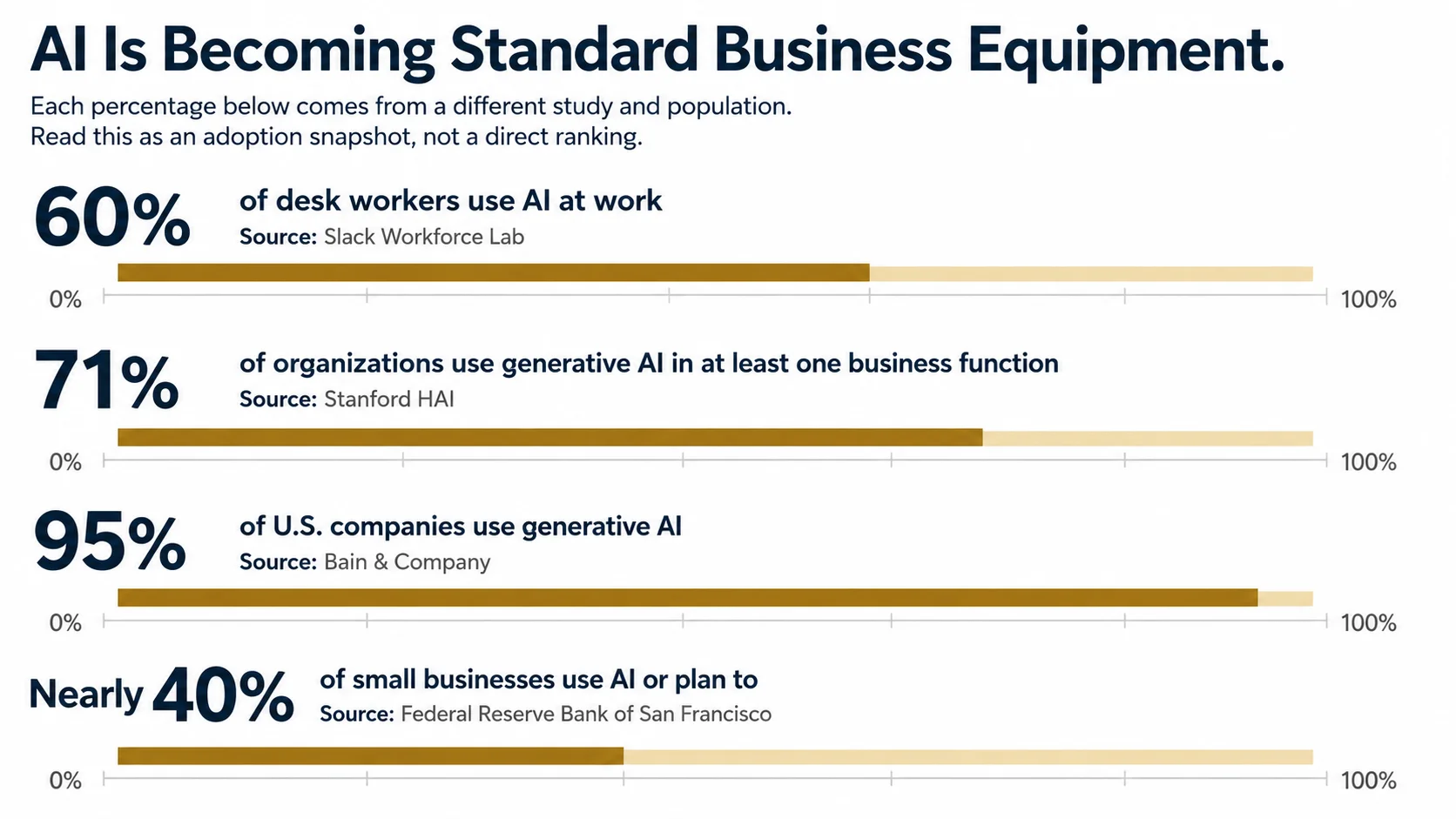
- Adoption is now mainstream. Bain reports 95% of U.S. companies use generative AI, and the Federal Reserve Bank of San Francisco found nearly 40% of small businesses use it or plan to.
- The fastest wins come from automating one clear, high-volume process while keeping a person on the loop.
- Results are real but usually incremental, so treat AI as a helper you supervise rather than a replacement you trust blindly.
What is AI workflow automation?
AI workflow automation is software that carries out the routine steps in a business process, moving data, sorting requests, drafting text, and flagging exceptions, while using AI to handle the judgment calls that older automation could not.
Traditional automation followed rigid rules: if this exact thing happens, do that exact step. It broke the moment reality got messy. AI widens the range of what can be automated. A language model can read a customer email, work out what it is asking, and draft a fitting reply. It can pull the key points from a long document or turn rough notes into a clean summary.
In plain terms, you connect the tools you already run, such as your inbox, your CRM, your spreadsheets, and your content tools, and let AI move work between them. The person stays in charge. The software does the copying, sorting, and first drafts. You review, approve, and make the calls that need real experience.
Why your processes are slower than they should be
Slow work rarely comes from one broken step. It builds up from friction spread across the day: manual handoffs, tools that do not talk to each other, and constant task-switching.
The numbers back this up. Beyond the 62% figure from Asana, Microsoft’s 2025 Work Trend Index found that the average employee receives 117 emails and 153 chat messages on a normal workday. Every one is a small interruption, and interruptions are expensive. It takes real focus to climb back into deep work after being pulled out of it, and that focus is hard to rebuild dozens of times a day.
For a small or growing business, the tax is heavier. You do not have a department for every job. The same person answers customer questions, updates the CRM, and builds the monthly report. When those routine tasks pile up, the skilled work, the strategy and the relationships and the creative, gets squeezed out. Automation goes straight at that friction so the repeatable parts stop stealing time from the parts that grow the business.
How AI speeds up everyday business workflows
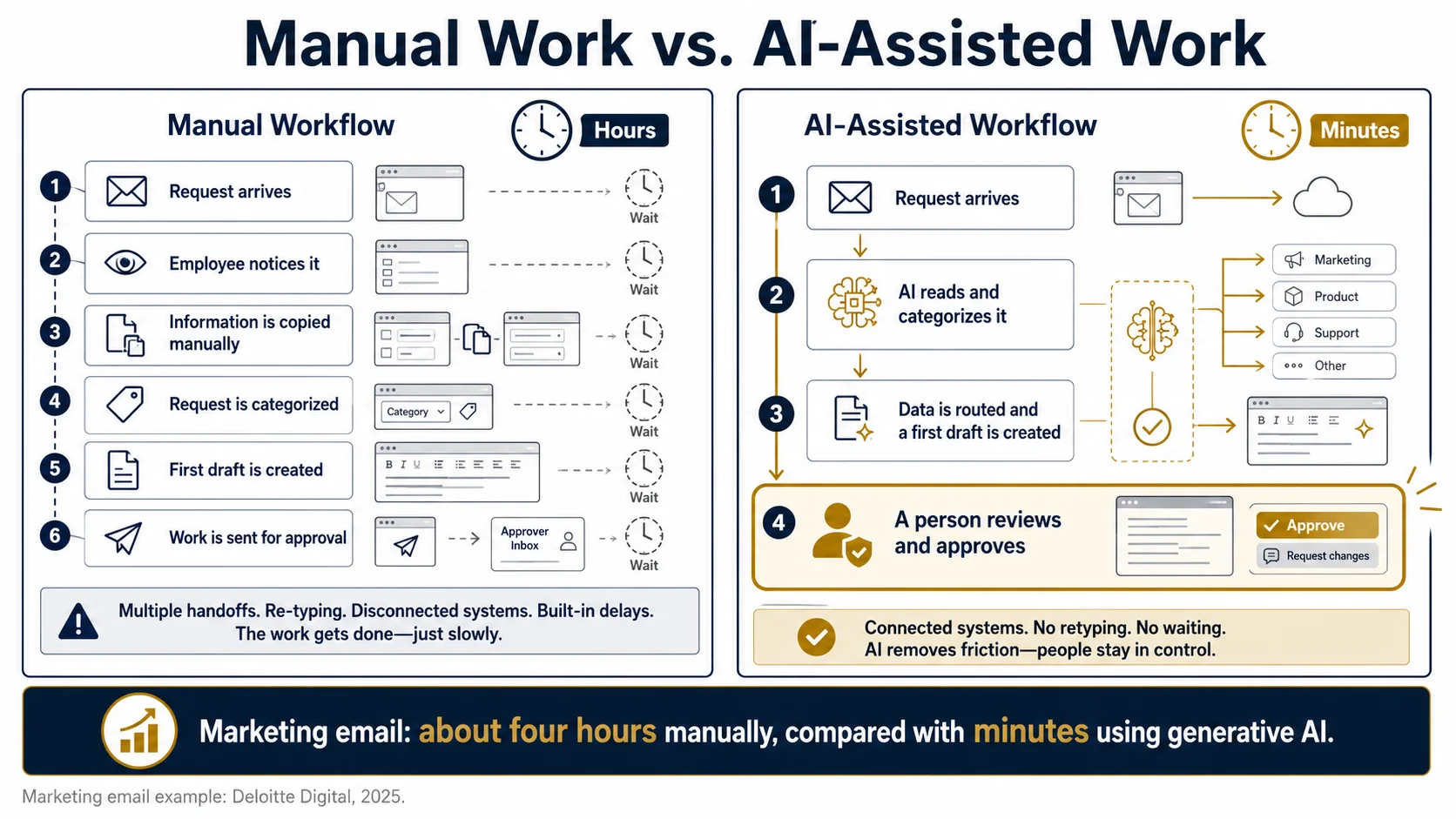
AI speeds up work by removing the wait and the retyping between steps. Instead of a task sitting in a queue until someone notices it, the software acts the moment it is triggered and routes anything unusual to a person.
Marketing shows this clearly. Deloitte Digital’s 2025 research on AI in marketing operations found that a human copywriter spent about four hours producing a single marketing email, while teams using generative AI produced comparable drafts in minutes. Among those adopters, 41% said AI had already cut content-production costs. The draft still needs an editor, but starting from a solid draft beats starting from a blank page.
The same pattern repeats across a business:
| Business area | A task AI can take on | What you get back |
|---|---|---|
| Marketing | Drafting emails, social posts, and ad copy from a short brief | Hours of writing time and a faster path from idea to publish |
| Sales | Reading, sorting, and routing new leads to the right person | Faster follow-up while interest is still warm |
| Customer service | Drafting answers to common questions and tagging tickets | Quicker replies and fewer requests slipping through |
| Operations | Pulling data into recurring reports and summaries | No more rebuilding the same report by hand |
| Admin | Turning meeting notes into action items and updates | Cleaner records without the after-hours catch-up |
Each row is a place where the work already follows a pattern, which is exactly what software is good at.
What the numbers say about AI at work in 2026
Adoption has moved from experiment to habit. For most owners, the question is no longer whether to use AI, but where to point it first.
A few recent findings put the shift in context:
| Finding | Source |
|---|---|
| 60% of desk workers now use AI at work, and 20% use it every day | Slack Workforce Lab, The New AI Advantage (2025) |
| Daily AI users are 64% more likely to report very good productivity and 81% more likely to report higher job satisfaction | Slack Workforce Lab (2025) |
| Use of generative AI in at least one business function jumped from 33% to 71% in a single year | Stanford HAI, 2025 AI Index Report |
| 95% of U.S. companies use generative AI, and more than 80% of use cases meet or beat expectations | Bain & Company (2025) |
| Nearly 40% of small businesses use AI or plan to | Federal Reserve Bank of San Francisco (2026) |
Read together, these point one way. AI at work is now normal, the people using it most report feeling more productive, and small businesses are not sitting on the sidelines. Tools that were novelties two years ago are becoming standard equipment.
Where AI automation pays off first
The best first project is boring on purpose: one repetitive, high-volume task with a clear right answer. Narrow beats ambitious every time.
There is good evidence for starting small. Stanford’s 2025 AI Index found that among companies already reporting a financial benefit from AI, the gains were usually modest, often under 5% in added revenue and under 10% in cost savings. That is not a knock on the technology. It is a reminder that value comes from stacking many small, reliable wins rather than one sweeping change.
Choose a process where you can measure the before and after. Common starting points include:
- New-lead intake and routing
- First-draft replies to routine customer questions
- Weekly or monthly reporting
- Turning long documents or recorded calls into short summaries
Keep a person on the loop while you build trust. Let the AI do the draft or the sort, and let your team approve the result. Once a workflow proves itself, with fewer errors and hours saved, you expand to the next one.
What to watch out for
AI automation is powerful, but it is not hands-off. The honest risks are skills, oversight, and data, and all three are manageable when you plan for them.
The skills gap is real. Bain’s 2025 survey found that 75% of companies struggle to find the in-house AI expertise they need. For a small business, that is an argument for a focused tool or a trusted partner over a sprawling custom build. Start with what you can actually support.
Oversight matters just as much. AI can write a confident answer that turns out to be wrong, so anything customer-facing needs a review step until it earns your trust. Automation also only works on top of decent data. If your CRM is a mess, clean it before you wire AI into it. None of this should stop you. It simply means treating automation as a system you manage, with checkpoints, rather than a switch you flip and forget.
How to get started with AI workflow automation
You do not need a big budget or a data team to begin. You need one process, one owner, and a way to measure the result.
A simple path works for most teams:
- Map one workflow you repeat every week, step by step.
- Mark the steps that are routine and rule-based. Those are your candidates.
- Pick one tool or partner to automate just those steps.
- Run it beside your current process and compare time, errors, and output.
- Keep what works, adjust what does not, then move on to the next workflow.
The goal is momentum, not perfection. One automated workflow that saves a few hours a week frees up time you can put back into customers and growth. If you would rather not sort the marketing and software pieces on your own, a short review of your current workflows is a practical way to find the one worth automating first. You can start with a workflow review whenever you are ready.
Frequently asked questions
Is AI workflow automation only for big companies?
No. Much of the value sits in small, everyday tasks that every business has. The Federal Reserve Bank of San Francisco found nearly 40% of small businesses already use AI or plan to. Affordable, off-the-shelf tools mean you do not need an enterprise budget to start.
How much time can AI automation really save?
It depends on the task, but the gains are concrete. Deloitte Digital found marketing emails that took about four hours by hand were drafted in minutes with generative AI. A realistic goal is to remove hours of repetitive work each week, not to automate everything at once.
Do I need technical skills to automate my workflows?
Usually not. Many modern tools connect your apps with simple visual setups and plain-language prompts. The harder part is deciding which process to automate and reviewing the output, and that judgment is something your team already has.
Will AI automation replace my employees?
For most small businesses, it shifts what people do rather than replacing them. Slack found that daily AI users report higher productivity and job satisfaction, largely because software takes the tedious work and leaves the human work to humans.
Work with us
We are Rumeira, a marketing and software team that helps growing businesses put practical automation to work, starting with the one process that will save the most time. This article draws on published research from Asana, Slack, Stanford HAI, Bain, Deloitte Digital, Microsoft, and the Federal Reserve Bank of San Francisco, alongside our own hands-on work building automated workflows for clients. You can read more about how we work or browse more articles on our blog.
Sources (accessed July 24, 2026):
- Asana, Anatomy of Work Index (2023)
- Slack Workforce Lab, The New AI Advantage (2025)
- Stanford HAI, 2025 AI Index Report (2025)
- Bain & Company, Generative AI Uptake Survey (2025)
- Deloitte Digital, Human–AI Marketing Collaboration (2025)
- Microsoft, Work Trend Index (2025)
- Federal Reserve Bank of San Francisco, Small Business Use of AI (2026)